
What is a JSON prompt?
A JSON prompt is a picture written as data. Instead of one long sentence, each part of the image gets a name: the subject, the style, the light, the mood, the colors, the framing, and the camera. Curly braces hold the object, quotes hold the words, and lists such as colors use square brackets. That is the whole idea. It is still a prompt. The braces just make each decision easy to find and easy to change.
People started pasting these objects into Gemini image tools, including the model nicknamed Nano Banana, because a labeled field is harder for the model to skip than a clause buried in a paragraph. GPT Image can read the same object when you paste it into the prompt box. The format is not a secret dialect. It is ordinary JSON, the same shape a programmer would use for a small record.
How do you turn an image into a JSON prompt?
You upload the picture and let a vision model fill the fields. On this page the tool sits above the guide. Choose a JPEG, PNG, or WebP. Reprompt (reprompt.org) is a free image-to-prompt tool: one upload returns the JSON and a flat text prompt, with no account. The browser shrinks the longest side to 1536 pixels and re-encodes the file as JPEG before it leaves your machine, which keeps the request small.
The same job exists as a text-first page at /image-to-prompt. Both pages call the same extractor. Use this page when you want the object first. Use the other page when you want the paragraph first. If you would rather read the steps without a tool, the image prompt extraction guide walks through the idea, and the Midjourney reverse prompt note covers the case where you only have the picture.
- Upload a JPEG, PNG, or WebP. Phone photos are fine. The page reduces the long side to 1536 pixels.
- Wait for the result. You get 11 JSON fields and one text prompt from that single photo.
- Copy the JSON, or download it as image-prompt.json. The text prompt is one click away if you need a paragraph.
- Paste the JSON into Nano Banana or GPT Image as the prompt text. For Midjourney, Flux, and Stable Diffusion, paste the flat text instead.
What does a real image-to-JSON result look like?
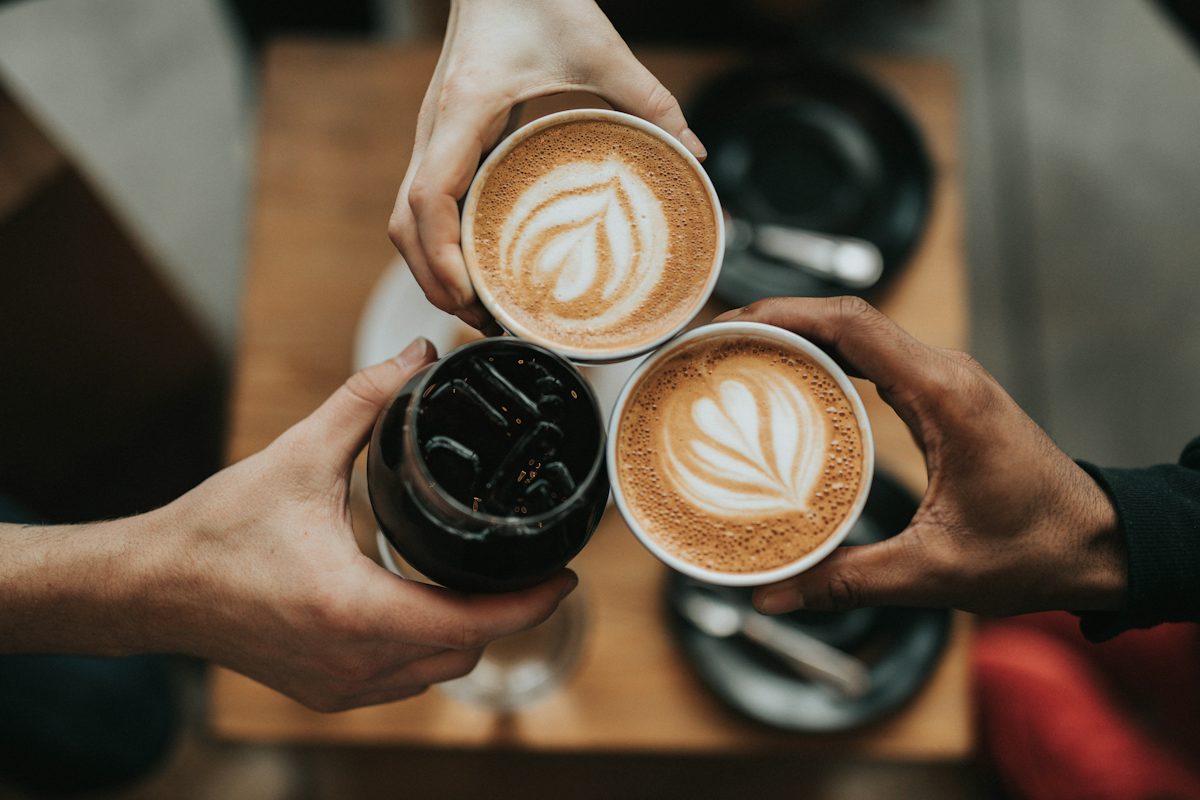
This is one run, not a mockup. On October 6, 2026 the photo below was sent through the same extractor this page uses. The photo is a 1200 by 800 crop. The model called the frame 3:2, which matches 1200:800. Lightly trimmed: a leading Prompt label was removed. The rest is the completion returned by the extractor on October 6, 2026.
Text prompt from that run
A high-angle, top-down shot capturing a celebratory "cheers" moment with three beverages held together over a wooden table. The subject includes two cups of hot latte, each featuring intricate, symmetrical heart-shaped foam latte art, and one glass of iced black coffee filled with dark, square ice cubes. Three distinct hands—one with fair skin holding the top latte, one with light skin holding the iced coffee, and one with tan skin holding the right latte—bring the drinks together in the center. The photography style is modern, intimate, and documentary-lifestyle. The lighting is soft, natural, and diffused, creating a warm, cozy atmosphere with deep, rich shadows and high-contrast textures on the foam and coffee. The color palette consists of warm earthy tones, deep browns, creamy whites, and muted wood grains. In the background, slightly out of focus, are two black ceramic saucers with silver spoons, resting on a textured light oak wooden tabletop. The composition is a tight, symmetrical triangle focused on the meeting point of the drinks. The image features a shallow depth of field, with the focus razor-sharp on the foam patterns and the ice, while the edges of the frame softly blur. Cinematic quality, shot on a 35mm lens, f/2.8, professional color grading, ultra-detailed texture, 8k resolution. Aspect Ratio: 3:2.
JSON prompt from that run
{
  "subject": "Three people holding coffee drinks for a toast",
  "style": "Lifestyle photography",
  "lighting": "Soft natural indoor lighting",
  "mood": "Warm, social, and cozy",
  "colors": [
    "Brown",
    "Cream",
    "Black",
    "Tan"
  ],
  "composition": "Top-down birds-eye view focusing on the clinking cups",
  "details": [
    "Latte art with heart patterns in two cups",
    "Iced coffee with ice cubes in one glass",
    "Hands forming a triangular arrangement",
    "Wooden table background"
  ],
  "aspectRatio": "3:2",
  "background": "A simple wooden surface with blurred black coffee saucers and spoons",
  "cameraAngle": "Top-down perspective",
  "technicalDetails": [
    "Shallow depth of field",
    "Focus on beverage foam and textures",
    "High contrast",
    "Matte finish"
  ]
}
The same JSON, flattened by hand
This sentence is built from the fields above so you can see a Midjourney-ready version. It is not a second response from the model. Add --ar 3:2 if you paste it into Midjourney.
Three people holding coffee drinks for a toast, Lifestyle photography, Soft natural indoor lighting, mood Warm, social, and cozy, colors Brown, Cream, Black, Tan, Top-down birds-eye view focusing on the clinking cups, Latte art with heart patterns in two cups, Iced coffee with ice cubes in one glass, Hands forming a triangular arrangement, Wooden table background, A simple wooden surface with blurred black coffee saucers and spoons, Top-down perspective, Shallow depth of field, Focus on beverage foam and textures, High contrast, Matte finish, aspect ratio 3:2
What does each JSON field mean?
The extractor always returns these 11 fields, in this order. The values are the model output for the coffee photo, not a cleaned-up sample. The sentences after each value explain the field.
- subject
- Three people holding coffee drinks for a toast. The thing the picture is about, in plain words. If you change only this field, you keep the lighting and the room and swap what is in the frame.
- style
- Lifestyle photography. The look: a lifestyle photo, a watercolor, a product render, a film still. Keep it short. A style field stuffed with ten movements usually fights itself.
- lighting
- Soft natural indoor lighting. Where the light comes from and how hard it is. Soft window light and a noon flash are different pictures even when the subject stays put.
- mood
- Warm, social, and cozy. The feeling, not the objects. Warm and social is a mood. A wooden table is not. If the mood disagrees with the lighting, the lighting usually wins, so edit them together.
- colors
- Brown, Cream, Black, Tan. A list of the dominant colors, not every speck. Three to six names is enough. Generators treat a long color list as a suggestion, then drift.
- composition
- Top-down birds-eye view focusing on the clinking cups. How the frame is built: centered, top-down, a triangle of hands, lots of empty space. This is the field to edit when the subject is right but the crop is wrong.
- details
- Latte art with heart patterns in two cups, Iced coffee with ice cubes in one glass, Hands forming a triangular arrangement, Wooden table background. A list of the small facts you would hate to lose, such as heart-shaped foam or ice in the glass. Put text that appears in the image here only if you copy it exactly.
- aspectRatio
- 3:2. A ratio string such as 3:2, 16:9, 4:5, or 1:1, based on the photo. Midjourney does not read this field. You turn it into a flag, so 3:2 becomes --ar 3:2.
- background
- A simple wooden surface with blurred black coffee saucers and spoons. What sits behind the subject. Name the surface and the blur. If you leave it vague, many models invent a busier room than the photo had.
- cameraAngle
- Top-down perspective. Where the camera is: top-down, eye level, low angle. It overlaps composition on purpose. Angle is the camera. Composition is the arrangement inside the frame.
- technicalDetails
- Shallow depth of field, Focus on beverage foam and textures, High contrast, Matte finish. Focus, texture, and contrast. Shallow depth of field belongs here. Skip fake camera claims you do not care about. A model will sometimes render the words 8k as clutter.
How do you use a JSON prompt in Nano Banana, GPT Image, Midjourney, Flux, and Stable Diffusion?
Only some of these tools are happy to see braces. If the product is a chat box that already understands long instructions, paste the JSON as the prompt. If the product is a classic image model with a caption box and flags, paste the flat text. This coffee photo was not regenerated inside each product. The notes describe how those prompt boxes work.
Nano Banana and Gemini
Nano Banana is the community name for Gemini's image model, the line that started with Gemini 2.5 Flash Image. In the Gemini app, Google AI Studio, and the Gemini API, the image prompt is a piece of text. There is no switch labeled JSON. Paste the object into that text box, braces included. Gemini tends to follow labeled fields, which is why JSON prompts for Nano Banana spread so quickly. If a field is ignored, repeat it in a short sentence under the JSON. The Nano Banana overview on this site covers the editing side of the same model.
GPT Image
GPT Image, in ChatGPT and in the OpenAI Images API, also takes a string. You can paste the JSON and the model will often treat each key as an instruction. The API parameter is still prompt, a string, not a schema with subject and lighting as separate arguments. If the UI counts characters tightly, use the flat text prompt instead of the object. A JSON prompt for GPT Image is a writing choice, not a different endpoint.
Midjourney
Midjourney does not accept this JSON. Paste the text prompt into /imagine or the web composer. Then add the aspect flag yourself. For this example, aspectRatio is 3:2, so the flag is --ar 3:2. Other useful flags, such as --stylize or a version flag, are yours to add. They are not fields in this schema. Raw braces in a Midjourney prompt mostly waste tokens on punctuation.
Flux
Flux, including Flux.1 and the dev and pro variants on hosts such as Fal, wants a natural-language caption. Paste the text prompt. A few websites wrap Flux with a chat model that will rewrite JSON before it reaches Flux. That rewrite is the wrapper, not Flux. If you are in ComfyUI or a plain prompt box, flatten first.
Stable Diffusion
Stable Diffusion front ends (Automatic1111, Forge, ComfyUI) put a positive prompt and a negative prompt in text boxes. Paste the flat text into the positive prompt. You can pull a phrase out of technicalDetails, such as shallow depth of field, if you like tag-style prompts. Do not paste the JSON object. And do not confuse this file with a ComfyUI workflow: those workflows are JSON because they store nodes and wires, not because the diffusion model reads a subject field.
| Tool | JSON as the prompt? | What to paste |
|---|---|---|
| Nano Banana (Gemini image) | Paste the JSON as the prompt text. The Gemini app and the image prompt box do not have a separate JSON mode. | The JSON object |
| GPT Image | ChatGPT and the OpenAI Images API take a string prompt. Pasting JSON often works because the model can read the fields. The API does not accept this 11-field schema as a typed parameter. | JSON, or the flat text if the box is short |
| Midjourney | No. A Midjourney prompt is prose plus flags such as --ar and --stylize. | Flat text, then --ar from aspectRatio |
| Flux | No. Flux expects a caption. Some websites put a chat model in front that can rewrite JSON, but Flux itself does not parse these fields. | Flat text |
| Stable Diffusion | No. Automatic1111, Forge, and ComfyUI want prose or tags in the positive prompt. A ComfyUI workflow file is JSON too, but that file is a node graph, not this prompt. | Flat text |
When is a JSON prompt better than a text prompt?
Use JSON when you plan to edit. Changing lighting from soft natural indoor lighting to hard side light is one line. In a paragraph you have to find the clause, hope you do not break the sentence, and hope you do not delete the cups while you are in there. JSON is also easier to compare across a batch of photos, because every record has the same keys.
Use the text prompt when the destination is Midjourney, Flux, or Stable Diffusion, or when you want to read the prompt once and paste it. A paragraph carries rhythm. Models trained mostly on captions often follow a sentence more smoothly than they follow a list of keys. GPT Image and Gemini can take either. If a JSON run comes back stiff, the text prompt from the same upload is the thing to try next, not a new photo.
| JSON prompt | Text prompt | |
|---|---|---|
| Shape | 11 named fields. Lists for colors, details, and technical details. | One paragraph, including an aspect ratio in the sentence. |
| Best edit | Swap a single field and leave the rest. | Rewrite tone, or hand the whole thing to Midjourney. |
| Paste into | Nano Banana / Gemini, and GPT Image as text. | Midjourney, Flux, Stable Diffusion, and also Gemini or GPT Image. |
| Failure mode | A missing comma makes the file invalid JSON. The model may also ignore a field. | A long sentence hides the one detail you meant to change. |
How do you edit a JSON prompt without breaking it?
Change one field, generate, then change another. If you rewrite subject, lighting, and style in the same pass, you will not know which edit moved the picture. Keep aspectRatio as a ratio with a colon, not a word like wide. Keep colors, details, and technicalDetails as lists, with commas between items and no comma after the last one.
JSON does not allow comments, trailing commas, or single quotes around text. If a download fails to parse, the usual cause is a comma you added while editing. Validate it in any editor that understands JSON before you blame the image model. Do not invent a twelfth field and expect the schema to carry it. Extra keys are fine as notes for you, but the tools above are only being asked to read the words they can see.
When the photo contains writing, on a cup, a sign, or a shirt, keep that spelling. The text prompt is instructed to copy visible text as it appears. If you correct it to what you think it should say, the next image will show your correction, not the original. For a private photo of a person, decide whether you want that face described at all. You can delete identifying details from the subject field before you paste.
What are the limits, and is the image stored?
The tool accepts JPEG, PNG, and WebP. The server rejects anything else, including GIF, and it rejects files over 5 MB. You should not hit that cap in normal use, because the page downscales first. There is a per-person pace limit and a daily ceiling so the free tool can stay up. If you see a busy message, wait and try again. It is not a bug in your photo.
Reprompt does not store the upload. The image is processed to write the prompt and then dropped. Do not upload pictures you do not have the right to send to an image model. The Android app, Reprompt AI, does the same kind of extraction on a phone if you want the workflow away from the desk.
JSON prompt questions
What is a JSON prompt?
A JSON prompt is an image description stored as named fields instead of one paragraph. Reprompt uses 11 fields: subject, style, lighting, mood, colors, composition, details, aspectRatio, background, cameraAngle, and technicalDetails. You paste that object into tools that read structured text, or you flatten it into a sentence for tools that do not.
How do I turn an image into a JSON prompt for free?
Open the tool at the top of this page, upload a JPEG, PNG, or WebP, and wait for the result. Reprompt (reprompt.org) returns the JSON and a flat text prompt from that one photo. There is no account. The browser shrinks the long side to 1536 pixels before the file is sent.
Does Nano Banana accept JSON prompts?
You can paste a JSON prompt into Nano Banana as the prompt text. Gemini's image tools, including the model people call Nano Banana, do not have a separate JSON switch in the consumer prompt box. The model reads the fields because they are still text. If the result ignores a field, switch to the flat text prompt and name that detail in a sentence.
Can I use a JSON prompt in Midjourney?
Midjourney does not accept this JSON schema. Copy the flat text prompt, paste it into /imagine or the Midjourney web app, and add --ar using the aspectRatio field. A value of 3:2 becomes --ar 3:2. Leave the braces out.
When is a JSON prompt better than a text prompt?
JSON is better when you want to change one thing, such as the lighting or the camera angle, without rewriting the whole description. A text prompt is better for Midjourney, Flux, and Stable Diffusion, and it is also easier to read out loud. Reprompt returns both so you can pick per tool.
Are uploaded images stored?
Reprompt sends the image to generate the prompt and does not store the file. Use photos you have the right to upload. Fair-use limits apply so the free tool stays available.
More tools live on the tools page. The text-first extractor is image to prompt. To aim a sentence at one model, use the prompt rewriter. For a clip, use image to video prompt. For a Gemini image prompt, use the Nano Banana prompt generator. To build JSON from words instead of a photo, use the JSON prompt generator. To name the look of a picture, use the art style identifier.