
What is an image to video prompt?
An image to video prompt is the motion brief for a still you already have. The photo holds the subject, the clothes or the objects, the light, and the frame. The prompt says what happens next: the action, the camera, the pace, and sometimes a sound. If you describe the whole picture again, you can contradict the photo. If you only say "make it move," the model picks a move you may not want.
Reprompt (reprompt.org) reads one JPEG, PNG, or WebP and an optional motion note. It returns a shot description, the subject action, one camera move, lighting and atmosphere, an audio cue, a duration suggestion, an aspect suggestion, a paragraph aimed at the model you picked, and the same fields as JSON. Free, no account. A pace limit and a daily ceiling apply. The browser shrinks the long side to 1536 pixels before the file is sent. This page does not render the video.
How do you turn a photo into a video prompt?
- Upload the still. Phone photos are fine. The page sends a smaller JPEG.
- Add a motion idea if you have one. "Steam rising, slow push-in" is a complete note. Leave it blank if you want the tool to choose a single calm move.
- Pick Veo 3, Sora 2, Kling, Runway, or generic. The paragraph changes. The fields stay the same so you can compare.
- Paste the paragraph into the video product. Set duration and aspect ratio with that product's controls. Use the JSON if you want to edit one field and rewrite the sentence yourself.
A still-image prompt starts at image to prompt. Named fields for Gemini are on image to JSON prompt. A prompt you already typed can go through the prompt rewriter.
How do Veo, Sora, Kling, and Runway want the prompt written?
These notes follow public prompting guides as of October 2026. If a control in the product disagrees with a sentence, use the control.
| Model | Prompt | Leave to the product |
|---|---|---|
| Veo 3 | Google's guide uses cinematography, subject, action, context, then style and ambiance. Add dialogue, SFX, and ambient noise. Veo 3.1, in the current Cloud guide, generates audio from that text. | That guide lists 4, 6, or 8 second clips, and 16:9 or 9:16. Set those in the tool. |
| Sora 2 | OpenAI's Sora 2 guide asks for a storyboard shot: framing, one camera move, one subject action in beats, and the light. "Takes two steps and stops" is clearer than "walks." | Duration and size are settings. Confirm Sora is still offered in your account before you rely on it. |
| Kling | Kling's camera guide uses subject, subject movement, and scene, then camera, lighting, and atmosphere. One move: push, pull, pan, tilt, track, orbit, or a static camera. | Duration and multi-shot switches live in Kling's own controls. This page writes a single shot. |
| Runway | Runway's image-to-video guide says to describe motion, not the still. Name the camera move, the subject action, and the pace. Say when something should hold still. | The uploaded frame is the first picture. Do not restate it in the prompt. |
| Generic | One paragraph with the shot, the action, the camera, and the light. The audio cue stays available if the tool can use it. | Whatever duration and aspect controls that tool has. |
What should you leave out?
Leave out a second camera move and any request to change a person's face or body. The photo is the reference for who and where. The prompt is the reference for motion. One action that can finish in a few seconds is easier to follow than a scene change. The JSON is the same information with labels, so you can swap "slow push-in" for "locked-off camera" without rewriting the paragraph. Paste the paragraph into the video tool.
What does a real image-to-video prompt look like?
One run from October 6, 2026. The still was sent with the note "slow push-in, a little steam rising from the coffee" and the target Veo 3. It is the same 1200 by 800 crop as the JSON prompt page. The model kept the toast, added steam, and left the sound in the audio field.
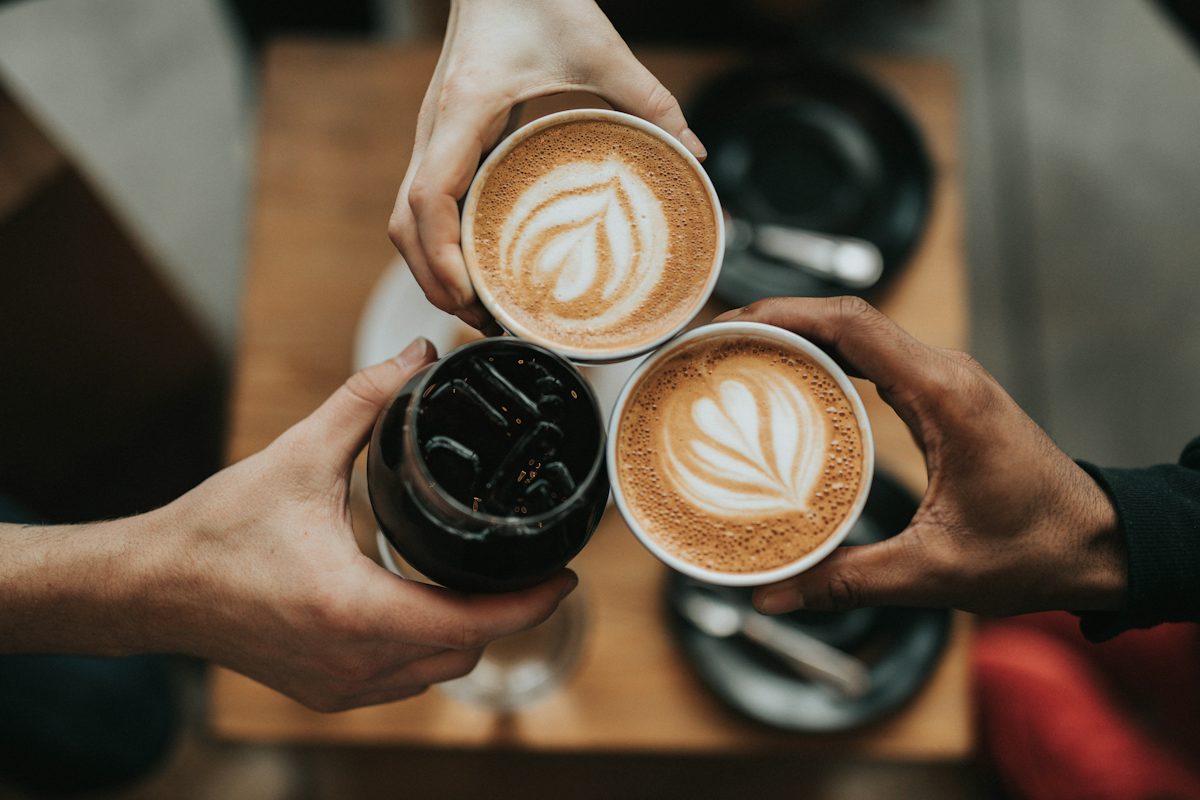
Prompt that came back
Cinematic overhead top-down shot of three people's hands holding two lattes with beautiful heart-shaped latte art and one glass of dark iced coffee, performing a friendly toast together over a wooden table. The hands move slightly inward to touch the cups together. Thin, delicate steam rises slowly from the hot lattes. The scene is captured in a professional, warm-toned, cozy café aesthetic with soft natural lighting and a shallow depth of field.
The fields beside it
- Shot: Top-down overhead shot of three hands holding coffee cups and a glass of iced coffee, forming a toast above a wooden table.
- Subject motion: The hands gently bring the cups together for a toast, with thin, wispy steam curling upward from the hot lattes.
- Camera: Slow, cinematic push-in towards the center of the three drinks.
- Lighting: Soft, warm, natural ambient light creating a cozy café atmosphere with slight vignetting.
- Audio: SFX: The sound of ceramic cups gently clinking together. Ambient noise: Low murmur of a busy coffee shop.
- Duration suggestion: 6 seconds. Aspect suggestion: 16:9.
For Veo, you can append the audio line, because Google's guide treats sound as part of the prompt. This run left it in its own field. Six seconds and 16:9 are in the Veo 3.1 Cloud guide's listed lengths and ratios. Set them in the product. The iced glass will not steam. Delete that clause if it looks wrong.
Image to video prompt questions
What is an image to video prompt?
An image to video prompt tells a video model how a still picture should move. The photo already has the subject, the light, and the frame. The prompt adds the action, the camera move, and sometimes a sound cue. Reprompt (reprompt.org) reads the still and returns those parts, plus one paragraph you can paste.
How do I write a Veo 3 prompt from a photo?
Google's Veo guide uses cinematography, subject, action, context, and style or ambiance, plus dialogue, SFX, or ambient noise. The Veo 3.1 Cloud guide lists 4, 6, or 8 second clips and 16:9 or 9:16. Set those in the product. This page only suggests them.
What does a Sora prompt need?
OpenAI's Sora 2 prompting guide treats the prompt as a storyboard shot: framing, one camera move, and one subject action described in beats. Duration and size are settings in the product, not a substitute for those settings. Check that Sora is available in the account you use. The same shot description still works as a generic video prompt if it is not.
How is a Kling prompt different from a Veo prompt?
Kling's camera guide asks for the subject, the movement, and the scene, then camera, lighting, and atmosphere. One move is enough: push, pull, pan, tilt, track, orbit, or a static camera. Several moves in one shot often look unsteady.
Does Runway want a description of the photo?
Runway's image-to-video guide says the still already defines the picture, so the text should describe motion: what the subject does, how the camera moves, and how fast. Restating the wardrobe and the background gives the model a second, possibly conflicting, description of a frame it can already see.
Do you generate the video on this page?
No. The page returns a prompt and a JSON copy of the same fields. You paste the prompt into Veo, Sora, Kling, Runway, or another image-to-video tool. Uploaded images are not stored. Sexual or explicit images, minors, and non-consensual edits of real people are refused.
Related tools: image to prompt, image to JSON prompt, prompt rewriter, and the Nano Banana prompt generator.