
How do I extract a Stable Diffusion prompt from an image?
First check whether the prompt is already there. A PNG saved by Automatic1111 or ComfyUI often keeps it in the metadata, and the PNG Info tab will show it. If the image went through Discord, Instagram, or a screenshot, that data is gone. Then you rebuild the prompt from what you can see, which is what this generator does.
- Upload one image. JPEG, PNG, or WebP. The shape of the file sets the suggested width and height.
- Pick the model family. SDXL, SD 1.5, or Flux dev. You can switch after the result without a new request.
- Copy positive and negative. Paste them into the two prompt boxes in Automatic1111, Forge, or ComfyUI.
- Set the starting settings. Use the suggested size, sampler, steps, and CFG, then adjust for your checkpoint.
Run a batch of four at the suggested settings before you change anything. One image tells you little. Four tell you whether the prompt or the seed is the problem.
What visual details does it pull out of the image?
Tags follow a fixed order: subject, pose or action, clothing or materials, setting, light, camera and framing, medium, color, then mood. Order matters because earlier tokens carry more weight in a long prompt. The three to five most important tags get a weight between 1.1 and 1.4.
It leaves out the filler tags people paste out of habit, like masterpiece, best quality, and 8k. They don't describe your image, and on many SDXL checkpoints they do little or nothing. Concrete words do the work: "soft window light" beats "beautiful lighting" every time.
What did a real image return?
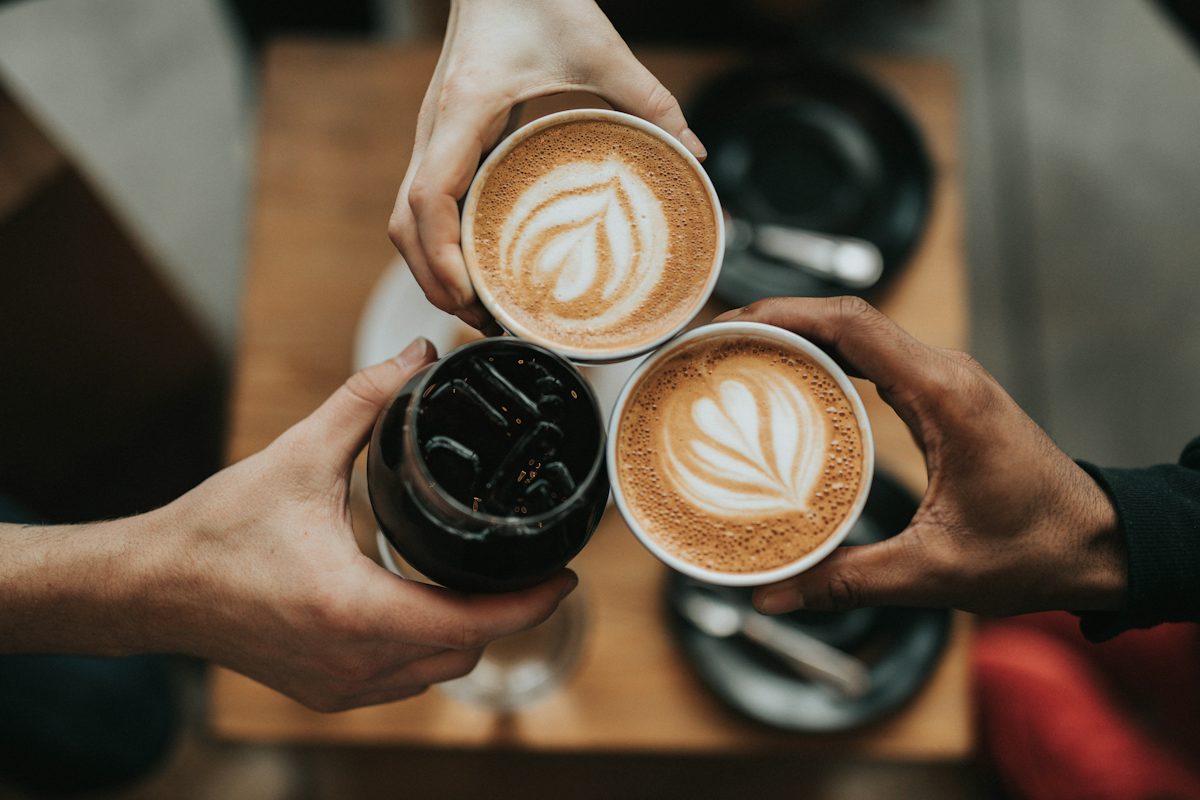
This is a 1200 x 800 photograph by Nathan Dumlao on Unsplash (https://unsplash.com/photos/three-person-holding-beverage-cups-6VhPY27jdps, https://unsplash.com/license). We ran it through the generator on 2026-10-07 with SDXL selected. The text below is the raw output.
Positive prompt
(three hands clinking coffee cups:1.3), (top down view:1.2), holding cups, latte art, iced coffee, dark liquid, coffee shop table, wooden surface, dark ceramic saucers, silver spoons, bokeh background, soft natural lighting, (photorealistic:1.2), macro photography, close up shot, neutral tones, warm atmosphere, high contrast, indoor setting, blurred background, realistic textures, detailed foam, sharp focus on cups, composition from above, hands reaching inwards
Negative prompt
distorted fingers, extra hands, fused fingers, morphing, deformed hands, missing fingers, bad anatomy, blur, low quality, watermarks, signatures, text, jpeg artifacts, overexposed, washed out colors, messy, unnatural lighting, warped cups
Settings it suggested
1216 x 832, DPM++ 2M Karras, 30 (25 to 40) steps, CFG 6 (5 to 7). Checkpoint type: photoreal.
Notice the negative prompt. It opens with hands and fingers because three hands are the hardest thing in this frame to render. That is the point of writing the negative for the picture instead of pasting the same 40 words every time. One tag to edit by hand: "high contrast" sits oddly next to soft natural light, so we would drop it on a second run.
Flux caption from the same run
A high-angle close-up shot shows three hands clinking coffee cups together in a cafe. Two of the cups contain lattes with intricate heart-shaped foam art, while the third cup holds iced black coffee. The hands are positioned over a wooden table with dark ceramic saucers visible below.
Which settings should I start with for SD 1.5, SDXL, and Flux?
| Model | Size | Sampler | Steps | CFG |
|---|---|---|---|---|
| SD 1.5 | About 512 x 768 (768 x 512 for a 3:2 photo) | DPM++ 2M Karras | 20 to 30 | 6 to 8 |
| SDXL | One megapixel buckets, e.g. 1216 x 832 for 3:2 | DPM++ 2M Karras | 25 to 40 | 5 to 7 |
| Flux dev | About one megapixel, multiples of 16 | Euler, Simple | 20 to 30 | 1, guidance 3.5 |
SD 1.5 was trained on 512 pixel images and SDXL around 1024 x 1024, so going far above those sizes in one pass tends to duplicate subjects. Generate near the native size, then upscale with hires fix or a separate upscaler. A checkpoint's model card beats this table whenever they disagree.
Should I use weighted tags or plain sentences?
For SD 1.5 and most SDXL checkpoints, tags with a few weights are the norm, and the community checkpoints were often trained on tag-style captions. Flux reads natural language through a T5 text encoder and ignores the (tag:1.2) syntax, so give it sentences. The tool returns both from one upload, so you don't have to run it twice.
Stable Diffusion prompt questions
Can this read the prompt saved inside a Stable Diffusion PNG?
No. Automatic1111 and ComfyUI can save the prompt in PNG metadata, and a tool like PNG Info will show it if it survived. This generator looks at the pixels instead, so it works on screenshots, JPEGs, and photos that never had a prompt.
What does (tag:1.2) mean?
It is attention weighting in Automatic1111, Forge, and ComfyUI. 1.0 is normal. 1.2 asks the model to pay about 20% more attention to that tag. The generator weights three to five tags and caps them at 1.4, because higher weights tend to burn in artifacts.
Why is the negative prompt different for every image?
Because the risks are different. A photo of hands needs extra fingers and fused fingers in the negative. A sign needs warped text. The generic defects like blurry, lowres, and watermark come after the specific ones.
Does Flux use the negative prompt?
Not at its usual settings. Flux dev is guidance-distilled and normally runs at CFG 1 with a Flux guidance value around 3.5, and at CFG 1 the negative prompt has no effect. That's why the tool gives you a plain-sentence caption for Flux.
Are the sampler, steps, and CFG values the best ones?
They are safe starting points, not a recipe. DPM++ 2M with Karras at 25 to 30 steps is a common default for SD 1.5 and SDXL. Some checkpoints publish their own settings, and those win. If a model card says CFG 4, use CFG 4.
Is it free?
Yes, with no account. A pace limit and a daily cap keep it available. Reprompt does not store uploaded images, and it doesn't produce prompts for sexual or explicit images, minors, or non-consensual edits of real people.
For a model-neutral prompt plus JSON, use image to prompt. For a Midjourney version with --ar, use the Midjourney prompt generator. The longer walkthrough on how to extract prompts from images covers metadata, manual description, and checking your result. To fix a prompt you already wrote, try the prompt rewriter.