
How do I reverse prompt a Midjourney image?
Usually you can't get the original prompt back. A file saved straight from Midjourney sometimes carries it in the metadata, but most images you find online have been cropped, re-saved, or screenshotted, and that strips it. What you can do is describe the picture the way Midjourney likes to read: subject first, then setting, light, medium, framing, and color. That is what this page does.
- Upload one image. Use a JPEG, PNG, or WebP. It is resized in the browser, and the shape sets --ar.
- Add an idea if you want a change. For example: same scene at night in the rain. Leave it blank for a straight reverse prompt.
- Pick parameters. Keep --v 7 to pin V7, toggle --raw, and add --s or --c if you want them.
- Paste into Midjourney. Copy the prompt into the Imagine bar on midjourney.com or after /imagine in Discord, then change one word at a time.
Change one thing per run. If the light is wrong, edit the light words and leave the rest. If you change five words at once you won't know which one helped.
What does a real reverse prompt look like?
Below is a 1200 x 800 photograph by Nathan Dumlao on Unsplash (https://unsplash.com/photos/three-person-holding-beverage-cups-6VhPY27jdps, https://unsplash.com/license). We ran it through this generator on 2026-10-07 with the default settings. Nothing was edited afterwards.
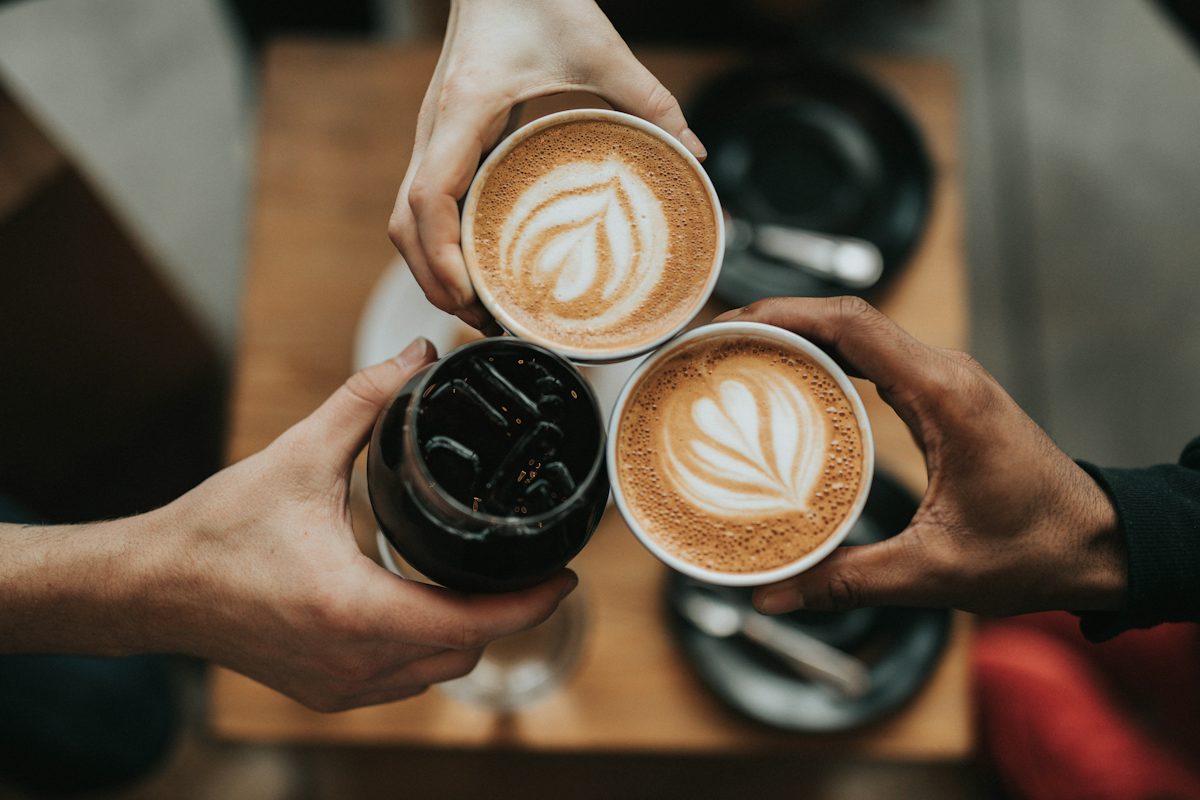
Top down overhead shot of three people clinking cups together in a toast. Two hands hold ceramic mugs with intricate heart latte art, while the third hand holds a glass filled with iced dark coffee. The setting is a wooden table in a cafe, lit by soft natural light. High angle photography with shallow depth of field, warm tones, and a cozy intimate mood. --ar 3:2 --v 7 --raw
| Part | Words in the prompt | Why they are there |
|---|---|---|
| Subject | three people clinking cups together in a toast | Defines the main action and what is in each cup. |
| Setting | wooden table in a cafe | Sets the surface and the place the toast happens. |
| Light | soft natural light | Asks for gentle, diffuse light like an indoor coffee shop by a window. |
| Camera | Top down overhead shot, high angle photography with shallow depth of field | Fixes the viewpoint and keeps the cups sharp while the background blurs. |
| Mood | warm tones, and a cozy intimate mood | Sets the palette and the feeling of the frame. |
The tool turned Raw on because this is a photo. It also flagged what a prompt won't copy exactly: the exact pattern of the latte art and the exact position of every finger. That's honest. Midjourney will give you a similar toast on a similar table, not the same one.
Which Midjourney parameters does the generator add?
Parameters go at the end of the prompt, after a space, with no commas. The generator follows that rule and only adds what you ask for. The ranges below come from Midjourney's own parameter pages, checked October 7, 2026.
| Parameter | Range | What it does |
|---|---|---|
--ar 3:2 | Up to 14:1 on V7 | Frame shape. Read from your upload so the composition has the same room. |
--v 7 | 7, or your account default | Pins the V7 model. Untick it to use your default version. |
--raw | On or off | Turns off default styling for a more literal, photo-like result. |
--s 250 | 0 to 1000, default 100 | How much of Midjourney's own taste goes into the image. |
--c 25 | 0 to 100, default 0 | How different the four images in one grid are from each other. |
A note on versions. Midjourney lists V8.2 as its default model since July 24, 2026, but plenty of people still pin V7 for a look they know. The prompt text works in both. Keep --v 7 ticked if you want V7, untick it if you don't.
Why won't I get an exact copy of the image?
Three reasons. The original seed is unknown, so even the original prompt would give a different grid today. The model has changed since most images online were made. And a sentence can't carry everything: a real person's face, a logo, exact lettering, or the angle of each finger. The generator lists one or two of those for your image so you know where to expect drift.
If you need closer matches, add the original as an image prompt or a style reference inside Midjourney. That uses the picture itself, which this page can't do for you.
How is this different from Midjourney's own Describe?
Describe gives you several short prompt ideas from an image. That's handy for brainstorming. This generator gives one longer prompt, sets --ar from your file, lets you blend in your own idea, and explains each part. Use whichever fits. Some people run both and keep the best words from each.
Midjourney prompt questions
Is this the original prompt that made the image?
No. The generator doesn't read file metadata, and reposted images rarely keep it anyway. It looks at what is in the picture and writes a new prompt that should land close to it. Treat it as a strong first draft, run it, and adjust one thing at a time.
How is the --ar value chosen?
From the width and height of your upload. A 1200 x 800 photo becomes --ar 3:2. A phone screenshot at 1080 x 1920 becomes --ar 9:16. Odd crops are rounded to the nearest common ratio, or to a small fraction like 7:5 if none is close.
Should I use --raw?
For photos, usually yes. Midjourney's docs say Raw turns off the default styling and gives more photo-like results with simple prompts. The tool switches Raw on when the picture looks like a photograph. You can turn it off with one click. Older guides write the same thing as --style raw.
Does it work with Midjourney V8?
Yes. The prompt text is plain English, so it works in V7 and V8. Midjourney's version page lists V8.2 as the default since July 24, 2026. Leave --v 7 ticked to pin V7, or untick it to use whatever version your account is set to.
What is the difference between --stylize and --chaos?
Stylize (0 to 1000, default 100) controls how much of Midjourney's own taste goes into each image. Chaos (0 to 100, default 0) controls how different the four images in one grid are from each other. Raise stylize for a more artistic look. Raise chaos when you want options.
Is it free, and is my image stored?
It is free with no account. A pace limit and a daily cap keep it available for everyone. The image is resized in your browser and sent once to the AI service that writes the prompt. Reprompt does not store uploaded images. Reprompt doesn't produce prompts for sexual or explicit images, minors, or non-consensual edits of real people.
Want the background first? Read the Midjourney reverse prompt guide. Working in another model? Try the Stable Diffusion prompt generator, the general image to prompt extractor, or the prompt rewriter if you already have words and want them tightened. To name the look of a picture, use the art style identifier.