
Prompt extractor · Midjourney
How to find the prompt of a Midjourney image
Last updated
If the image is still on Midjourney, open it on midjourney.com or in the original Discord message: the full prompt and parameters are listed right there. If it has been downloaded and reposted, the prompt is gone. Run /describe in Midjourney or upload it to a prompt extractor to get a close replacement, then add the flags yourself.
Want to skip ahead? The free prompt extractor reads any JPEG, PNG, or WebP and gives you a text prompt and a JSON prompt. No account needed.
Where is the original prompt stored?
Midjourney keeps the prompt with the job, not inside the picture. That one fact explains why it is easy to find sometimes and impossible other times.
- On midjourney.com. Open the image from Explore, from your own Create or Organize page, or from a creator's profile. The prompt and its parameters are shown beside the image, and you can copy them or reuse them in one click.
- In Discord. Find the bot message that delivered the grid or the upscale. The prompt sits in bold above the image, followed by the flags. Searching the server for a few words you remember is often faster than scrolling.
- In the file name. Images saved from Discord are usually named after your username plus the first words of the prompt and a job ID. It is a partial prompt, but it tells you the subject and confirms you have the right job.
- Ask the person who made it. Plenty of creators share prompts when asked. It is also the polite route if you plan to post something close to their work.
What if the image was reposted on Pinterest or Instagram?
Then nothing on the file will tell you the prompt. Social platforms recompress images, drop metadata, and rename the file. What you can do is describe the image well enough to get the same style, and that is what a prompt extractor is for.
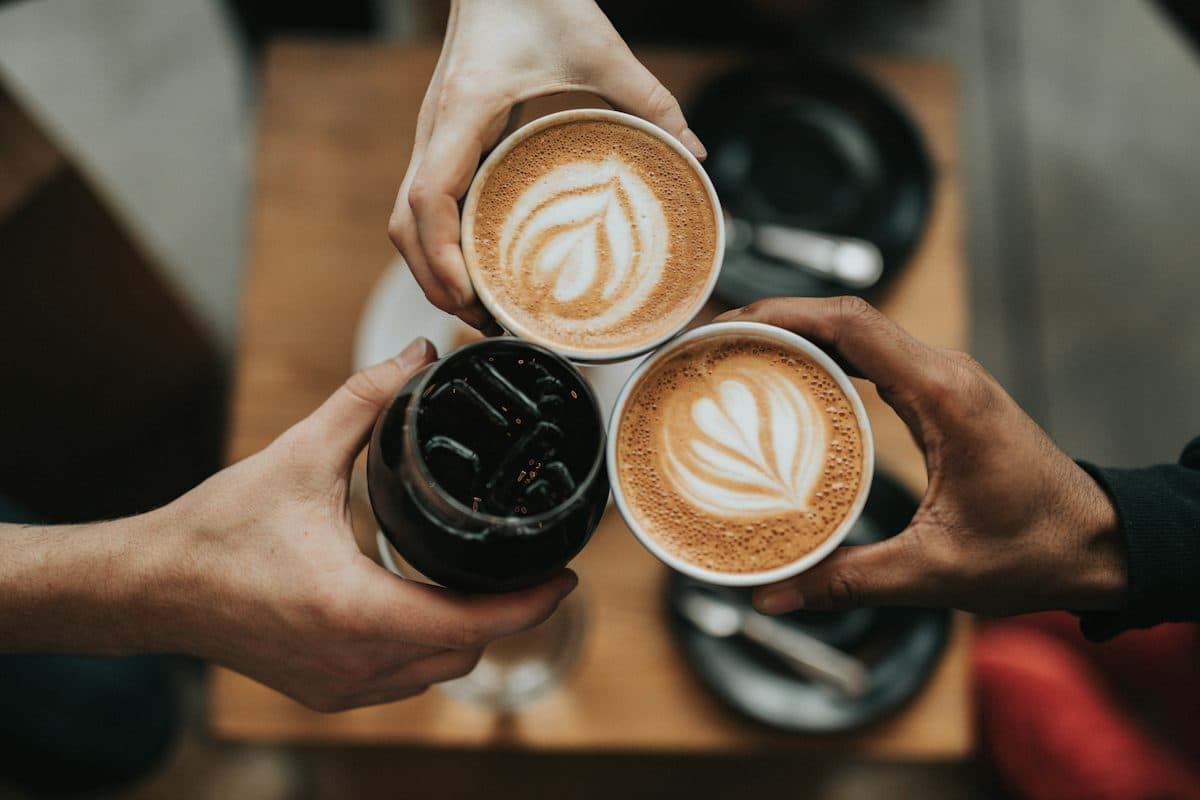
We ran the photo above through Reprompt's Midjourney prompt generator on 2026-10-07. It uses the same extractor as the main prompt extractor, then shapes the result for Midjourney and works out the aspect ratio from the picture. This is the output, unedited:
Prompt
Top down overhead shot of three people clinking cups together in a toast. Two hands hold ceramic mugs with intricate heart latte art, while the third hand holds a glass filled with iced dark coffee. The setting is a wooden table in a cafe, lit by soft natural light. High angle photography with shallow depth of field, warm tones, and a cozy intimate mood.
Flags
--ar 3:2 --v 7 --raw
Notice what it could not copy: the exact pattern of the latte art and the exact position of every finger. No prompt can pin those down, so expect your version to differ in small ways.
Should you use /describe or a prompt extractor?
Use /describe when you are already inside Midjourney and want ideas in its own vocabulary. It returns four short prompts, and they tend to name artists and moods rather than spell out the layout.
Use an extractor when you want a literal description you can edit: who is in the frame, where the light comes from, what lens it looks like. It also helps when you plan to try the same idea in Flux or Nano Banana, since the text is not tied to Midjourney's style.
A good habit is to take the extractor's subject and camera lines, add one or two style words from /describe, and then set the flags. For more on the reverse-prompting side, see the Midjourney reverse prompt guide.
How do you get the copy closer to the original?
- Match the aspect ratio first. A wrong
--archanges the composition more than any adjective will. - Try
--rawfor photos. It cuts Midjourney's default polish, which helps when the original looks like a real camera shot. - Change one thing per run. If you swap the lighting and the lens together, you will not know which one helped.
- Use the original as an image prompt or style reference if you have the right to. That gets you closer than words alone.
Questions people ask
Can I see the prompt of any Midjourney image?
Only when you can open the image on Midjourney itself, either on midjourney.com (Explore or the creator's page) or in the Discord message that produced it. Once someone downloads it and reposts it on Pinterest or Instagram, the prompt does not travel with it. Then you are estimating it, not recovering it.
Does a Midjourney PNG store the prompt in its metadata?
Don't count on it. Some downloads carry a description or a job ID, and Discord downloads often have part of the prompt in the file name. Social sites strip metadata and rename files, so a reposted image usually has neither.
Is /describe better than an image-to-prompt tool?
/describe gives you four short suggestions written in Midjourney's own style, which is handy if you are already in Midjourney. A prompt extractor gives one longer, more literal description plus a JSON breakdown, and it works for other models too. Many people run both and merge the best lines.
Will the recovered prompt make the same image?
No. Even the exact original prompt gives a different image on a new run, because the seed and often the model version differ. Aim for the same look and composition, then adjust --ar, --stylize, and --v until it is close.