
Prompt extractor · ChatGPT and DALL-E
How to get the prompt from a ChatGPT or DALL-E image
Last updated
If you made the image, go back to that chat and ask: "Show me the exact prompt you sent to the image model." ChatGPT usually rewrites your request, and that rewritten version is the real prompt. If all you have is the file, the prompt is not stored in it, so upload it to a prompt extractor and you get a fresh, detailed prompt in a few seconds.
Want to skip ahead? The free prompt extractor reads any JPEG, PNG, or WebP and gives you a text prompt and a JSON prompt. No account needed.
Where does ChatGPT keep the prompt it used?
In the conversation, not the picture. Since ChatGPT can expand a short request ("a cozy coffee shot") into a paragraph, the words you typed and the words the model received are often different.
- Open the chat that produced the image. Shared links work too if the owner sent you one.
- Ask for the exact prompt used for that image. Be specific about which image if there are several.
- Copy it somewhere safe. If you plan to reuse the look, save the prompt next to the file so you are not hunting for it next month.
Older DALL-E 3 images in ChatGPT showed the rewritten prompt when you opened the image and clicked its info icon. If you still have those chats, that is the quickest place to look.
What if you only have the image file?
Then you rebuild the prompt from what is in the frame. That is what an extractor does: it looks at subject, framing, light, color, and texture, and writes them down the way an image model expects to read them.
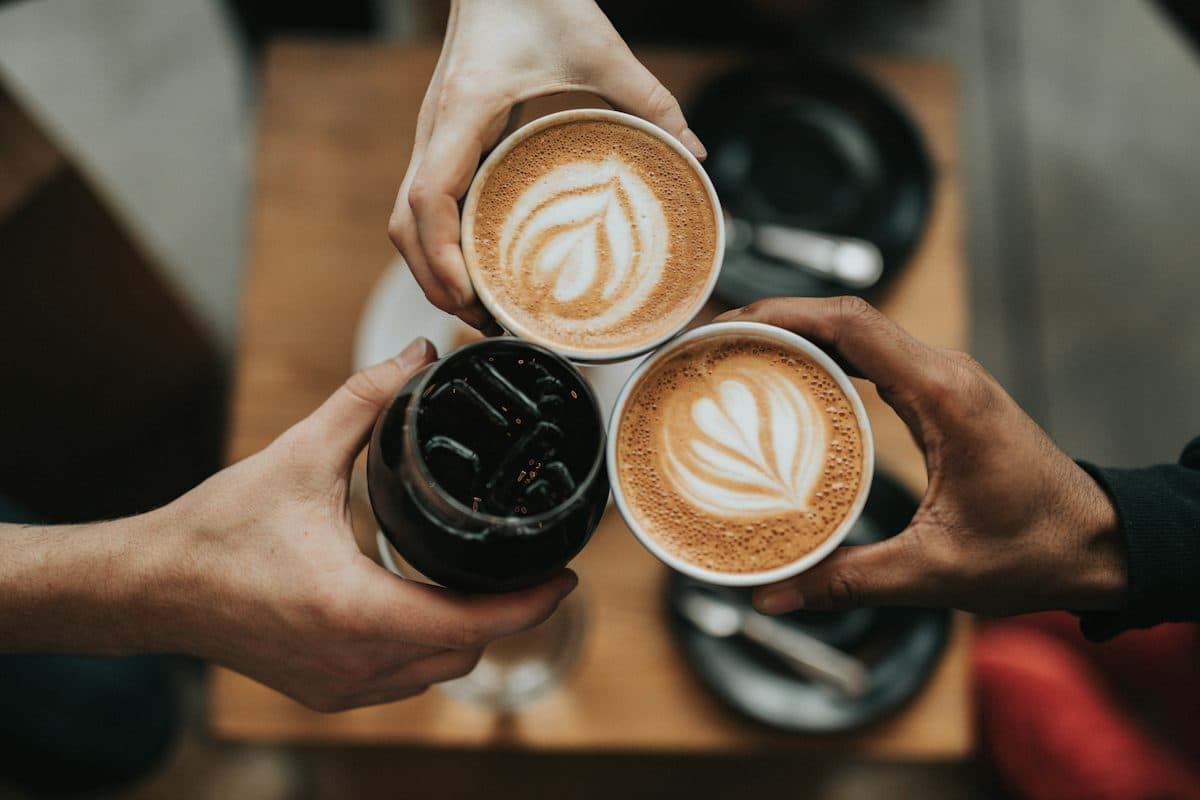
Here is what the Reprompt prompt extractor returned for the photo above on 2026-10-06. This is the text prompt, and it pastes straight into ChatGPT or GPT Image:
Text prompt
A high-angle, top-down shot capturing a celebratory "cheers" moment with three beverages held together over a wooden table. The subject includes two cups of hot latte, each featuring intricate, symmetrical heart-shaped foam latte art, and one glass of iced black coffee filled with dark, square ice cubes. Three distinct hands—one with fair skin holding the top latte, one with light skin holding the iced coffee, and one with tan skin holding the right latte—bring the drinks together in the center. The photography style is modern, intimate, and documentary-lifestyle. The lighting is soft, natural, and diffused, creating a warm, cozy atmosphere with deep, rich shadows and high-contrast textures on the foam and coffee. The color palette consists of warm earthy tones, deep browns, creamy whites, and muted wood grains. In the background, slightly out of focus, are two black ceramic saucers with silver spoons, resting on a textured light oak wooden tabletop. The composition is a tight, symmetrical triangle focused on the meeting point of the drinks. The image features a shallow depth of field, with the focus razor-sharp on the foam patterns and the ice, while the edges of the frame softly blur. Cinematic quality, shot on a 35mm lens, f/2.8, professional color grading, ultra-detailed texture, 8k resolution. Aspect Ratio: 3:2.
It is long on purpose. GPT Image follows detail well, so you can cut lines you do not care about rather than guess at ones you are missing. The same run also returned a JSON version, which is handy when you want to change just one thing:
JSON prompt (first fields)
{
  "subject": "Three people holding coffee drinks for a toast",
  "style": "Lifestyle photography",
  "lighting": "Soft natural indoor lighting",
  "mood": "Warm, social, and cozy",
  "composition": "Top-down birds-eye view focusing on the clinking cups"
}
How do you reuse the prompt without copying someone's work?
Keep the parts that are technique and change the parts that are the idea. Light, lens, palette, and composition are fair to learn from. The specific subject and any recognizable character or brand belong to whoever made it.
A simple swap goes a long way. In the coffee prompt, change the drinks to glasses of orange juice and the wood to white marble, and you have a new image with the same warm, top-down feel. The prompt rewriter can reshape the result for Midjourney, Flux, or Nano Banana if you want to try another model.
Questions people ask
Does ChatGPT rewrite my image prompt?
Often, yes. When you ask ChatGPT for a picture, it can expand your request into a longer prompt before the image model sees it. That longer version is the one worth recovering, because it is what actually shaped the picture.
Is the prompt saved inside a ChatGPT image file?
Not in a form you can read as a prompt. OpenAI adds C2PA Content Credentials that say the image was made with its tools, but you should not expect the prompt text in there. Social sites also strip that metadata when the image is reposted.
Can I get the prompt from someone else's ChatGPT image?
Not the exact one, unless they share the chat. You can upload the picture to a prompt extractor and get a detailed prompt that reproduces the subject, layout, light, and style, which is usually what people are after.
Which prompt format works best for GPT Image?
Plain sentences. GPT Image and ChatGPT read natural language well, so a clear paragraph beats a pile of comma-separated tags. Structured JSON also works when you want to change one field, like the lighting, without touching the rest.